
Introduction
The Inglenook puzzle is a basic train shunting puzzle. The real world problem is to build a train of boxcars, in the best order for delivery of goods along the train's rout. In the puzzle available boxcars are on three sidings. A web search will reveal several websites and videos describing the puzzle, variation and other's implementations.
My approach is to write a computer control program to solve the puzzle and control a model railroad executing the solution. Working on my other 'control process' project, Train Thing, I stumbled onto the Inglenook puzzle. I was/am having trouble with the Train Thing, controlling four trains to follow randomly assigned overlapping/intersecting paths in a non-deterministic manner, along with graphics. The Inglenook puzzle looks like a simpler process to work on while developing the needed skills to then apply to Train Thing.

This screen shot illustrates part of my solution to the Inglenook puzzle. The color coded boxcars are shown in a random starting order. The colored numbers show a random order for the boxcars to solve the puzzle. At the top, sidings 1 and 2 can each hold at most three boxcars. Siding 3 can hold at most five boxcars. On the right is the head shunt, which can hold at most three cars along with the switcher/locomotive. The two red 'track' switches, or turnouts, are used to connect the head shunt with a siding so cars can be moved between them. At the end of a move, when the switcher is back on the head shunt, rolling stock cannot be sitting on a turnout.
My plan is to use this software as a stand-alone simulator and secondly as a driver/controller of a model railroad implementing the Inglenook puzzle.
I plan on two modes of operation for my inglenook puzzle implementation: An automatic modes where the computer solves the puzzle, and a manual modes where the user can enter moves, one at a time, to solve the puzzle.
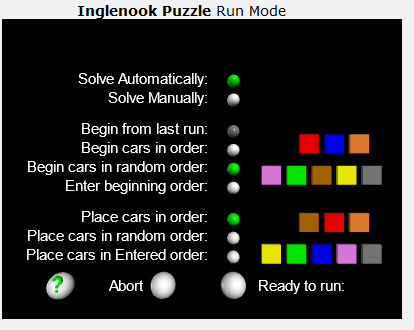 In either case you can select the starting order of the boxcars. You can select to have the boxcars in numerical order, a randomly generated order, or you can manually enter the starting order of the boxcars.
For the order to solve the puzzle you have the same three options: A generated random order, in order or you can enter the order. The program will check to be sure that the starting order and the ending order of the boxcars are not the same.
Looking forward to having the simulator also control a model railroad, the system will save the ending order of the boxcars from one run and use that as the default starting order for the next run. In this way it will not be necessary for the HOG (hand of god) to reorder the physical boxcars or the user to enter the beginning order each run of the simulator.
At left is an example of the screen to setup the Inglenook simulator for an initial run, starting in random order and ending in numerical order. The boxcar, numbered 1-8, are in IEC (International Electrotechnical Commission) color code order: (0) Black, (1) Brown, (2) Red, (3) Orange, (4) Yellow, (5) Green, (6) Blue, (7) Violet, (8) Gray, and (9) White.
In the manual mode the following is displayed in the top right corner of the screen.

In this example of a user entered move, two boxcars will be moved from siding three to the head shunt. "Move from siding 3, 2 boxcars."
The Bulletin Board on the main TrainThing Menu includes an Inglenook Puzzle forum where you can enter comments, make suggestions, and ask questions.